Music & sounds
My First Xylophone
Tap a colorful bar or press a key. Make a little tune, one note at a time.
Play now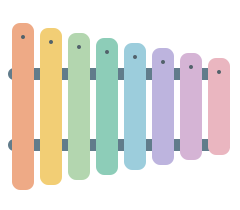
How to play
- Tap or click any colored bar to hear its note.
- On a keyboard, use the letters shown on the bars. Other keys play too.
- Slide across the bars to play a run of notes. Explore together.
A simple online xylophone
This is a little musical instrument for the browser. Like a piano, neighboring keys play neighboring notes, but there are eight colored bars and a gentle xylophone sound. There are no lessons to complete: listen, repeat a note, or make a tune together.
Make it right for your child
The eight bars cover one octave: Do, Re, Mi, Fa, Sol, La, Si, Do. In the parent panel, you can switch to C, D, E note names and choose AZERTY, QWERTY or QWERTZ if the suggested keyboard layout does not match yours.
During play, click or touch and hold “Parents” for two seconds, or type parent. You can also change the sound, background and motion.
There are no difficulty levels to set. Let your child explore one bar or the whole instrument, take turns and stop whenever you are ready.
In Parents or at the end, listen again or download your child's little tune. The latest notes are kept only for this session, up to 12 seconds. The WAV audio is made on your device, without a microphone or upload.
Two little ways to play together
Echo a tune. Play two notes slowly, then let your child try the same two bars. Swap roles and follow the notes they choose. A single repeated note is a tune too.
Listen from low to high. Tap the first bar, then the last. Hear how the sound changes, then walk your fingers along the bars from one end to the other.