Colors & sorting
Color Baskets
A pink apple, a pink basket. Help each little object find its matching color.
Play now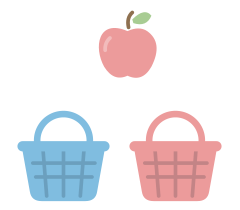
How to play
- Look at the object and its color.
- Tap or click the basket with the same color. You can also drag the object there, but a tap on the basket is enough.
- Watch it settle into the basket, then try the next object. Your finished baskets appear at the end.
Playing with a keyboard? Press 1, 2, 3 or 4 to choose a basket from left to right, using only as many numbers as there are baskets. Or use the arrow keys to select a basket, then press Enter or Space to choose it.
A first color matching game
Color Baskets pairs a visible object with a matching basket. Explore the colors together, say their names if you like, and let your child take the next turn. The parent can adjust the number of choices without changing the gesture.
Make it right for your child
Start with two baskets for a simple choice. When your child wants more colors to sort, choose three or four in the parent panel. Changing the level restarts the game.
Tap the object whenever you want a hint. After a first mix-up, there is time to compare the colors and try again; another mix-up gently highlights the matching basket. A quiet idle hint is optional.
Turn on Matching marks in Parents to add a simple mark to each object and its matching basket. You can also adjust the sound, choose gentler motion or turn off idle hints.
During play, click or touch and hold “Parents” for two seconds, or type parent. The panel also lets you choose a background.
Ages are a guide. Try a few objects together and let your child choose the next basket. There is time to look, try again or take a break.